Your AI.
Across your devices.
Your private AI. It runs on the machines you own and connects them through one encrypted mesh.
The problem
Every AI you use ships your files, chats, and thoughts to someone else's servers.
Everyone now says they won't misuse it.
No one lets you prove it.
What it is
A private AI that actually stays private.
Runs on your device
A real on-device AI over your own files: ask, search, extract. Once the model is set up, it works offline. Third-party open weights we package and run, not a model we trained.
Your devices, one mesh
Your machines become one private workspace. Ask on one, and the machine holding the file answers. A laptop with no model can use the one on a second paired machine. Everything crosses an encrypted link.
Checkable, not promised
Work can carry a signed receipt: fingerprints of the exact input and output, signed on your device. Anyone can re-check it offline.
Edge in action
See what it looks like.
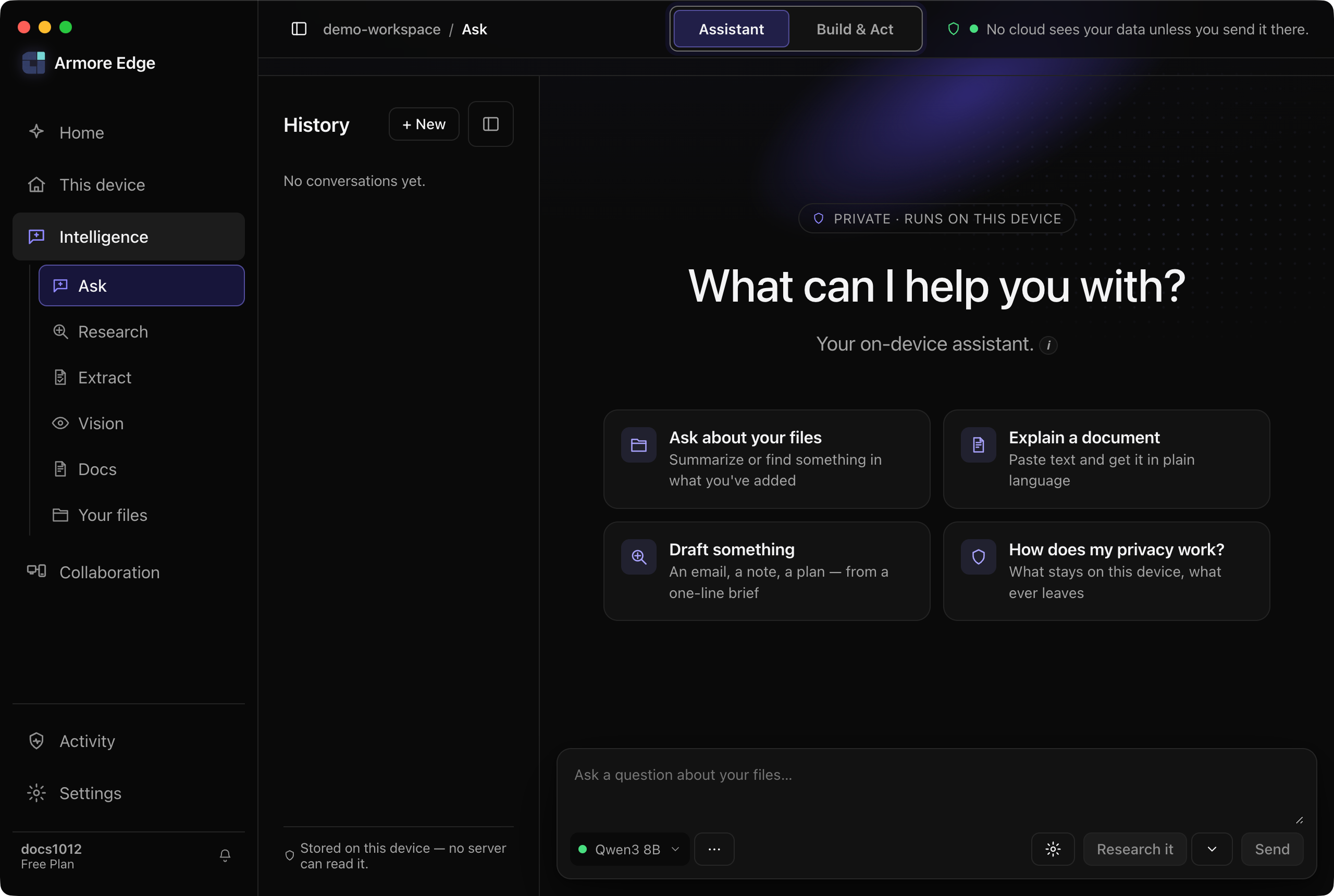 Now shipping · v1.0.12
v1.0.12 shipped on 13 November 2026. The downloads below are v1.0.12.
v1.0.12 · shipping now
The workspace in the frame above: one Intelligence rail for Ask, Research, Extract, Vision and Docs, an Assistant / Build & Act switch, and a Context Inspector showing what an answer was allowed to read.
Hosted web not open yet
The same workspace in a browser, with nothing to install — for the machine you borrow, the one you were not issued, and the colleague you want to show it to. It would reach your own machine through a relay that carries ciphertext and holds no key. The address is live and the gateway answers; what is missing is a way to put your machine behind it and keep it there, so there is nothing to hand you yet.
Cloud
Capacity for the jobs that outgrow the machine in front of you, without giving up the local workspace they started in. You approve each call, and a ceiling you set stops it before it spends.
How it works
Local by default.
Together when you want.
- 01
Install
Native installers for macOS, Windows and Linux.
- 02
Set up your model
On first launch Armore fetches an open-weight model and runs inference on your device, offline from then on. No room for a model? Use the one on a second machine you have paired.
- 03
Point it at your files
Ask, search and extract across your documents locally. Answers are grounded in the source: where a document doesn't support a value, Armore leaves it blank rather than inventing one.
- 04
Point it at your tools
Connect Claude Code, Codex, Copilot, Cursor and other MCP clients. Retrieval runs on your machine, so your tools spend fewer cloud tokens.
- 05
Add a device
Join another machine to your workspace with its workspace key. Each device holds its own private keys.
- 06
Work across them
Message and query across your devices over end-to-end encrypted links. Devices connect directly. A self-hostable relay can carry the session instead, and it cannot read the content.
One system
One workspace,
spread across your machines.
Shared compute
Run the model on one machine and ask from another. Between two paired machines, a laptop with no model sends its question to the one that has it, over your encrypted link.
Retrieval across devices
Ask on one machine; the machine holding the file answers. The question crosses as an embedding, and the passage that answers it returns over an encrypted link.
Workspaces
Add a device or a person with a workspace key. Everyone holding the key reads the workspace's messages; you decide who holds it.
Messaging
End-to-end encrypted, with read receipts and reactions. Messages to an offline device queue and deliver when it returns.
Hosting
Let a colleague query your workspace without receiving your documents. Every search runs under your approval.
Git over the mesh
The git-remote-armore helper makes a workspace a git remote: push between your machines over the encrypted link, not through a hosting service.
How verification works
Do the work.
Keep the receipt.
-
01
Signed on your device.
-
02
The receipt travels, the file doesn't have to.
-
03
Anyone can re-check it.
Measured
What answering locally saves, and where it stops.
How it was measured. One run on an M5 (24 GB) against an earlier build (app.asar dcb7da6f…), not today's download, with a no-document control on every task.
≥88% less context sent to the cloud, on retrieval.
Where the documents help.
Compare task performance against a no-document control.
| Task class | With your documents | No-document control |
|---|---|---|
| Extraction / lookup | 98% overall · 10/10 strict | 25% (+72 pp) |
| Multi-hop extractive | 96% | 4% (+92 pp) |
| Yes/no judgement | 54% | 42% (+12 pp, noise) |
Compared
Cloud AI asks you to trust. Armore lets you verify.
| Feature | Cloud AI | Local dev tools | Armore Edge |
|---|---|---|---|
| Where the AI runs | their servers | your machine | your own devices |
| Easy to use | yes | no, a toolchain | a real app |
| Devices work together | no | no | yes, encrypted mesh |
| Privacy is… | a promise | local, unproven | signed receipts, checkable offline |
Download
Free to download.
macOS
Signed and notarised by Apple.
Or with Homebrew
brew tap armore-ai/edge
brew trust armore-ai/edge
brew install --cask armore-edge
Windows
Windows 10 / 11, not code-signed yet
Linux
Ubuntu 24.04+ / Debian 13+, x86_64, not code-signed
Or with apt
curl -fsSL https://edge.armore.ai/apt.sh | sh
Release notes
What's in v1.0.12
What changed in this release. Full release notes and files →
- new
Open it in a browser, from a switch. Your own machine can serve the real app to a browser tab, and turning that on is now a card in Settings rather than an environment variable on a command line. The card states what the browser surface can and cannot do, and shows the address itself. The first time you enable it the app needs one restart — the setting is persisted, and the handlers it serves are installed at startup.
- beta
A cloud tier, when you bring your own. Point it at an OpenAI-compatible endpoint you supply — a hosted API, or something you run yourself — and the cloud option opens against the provider you chose and bill. It is off until you do that, and every call still asks. Armore's own hosted service is not open yet, and no served request has been witnessed on a release build, which is why this one says beta.
- new
Linux on arm64, and macOS ships its signing records. There are now arm64 Linux builds — a .deb and an AppImage — where before there were none. And this is the first release to publish the twelve macOS signing records as files you can download beside the installers, so the notarisation is checkable without taking our word for it. Windows and Linux are still not code-signed.
Release news
Download it now.
Hear about the next one.
Nothing gates the download; the list is only how we tell you when the next build lands.
You're on the list.
One email when the next build is ready. Nothing else.
What's next
- A model download that picks up where it stopped
- Your own cloud endpoint actually reached, not only configured
- Paired machines that answer over a restrictive network, not only a direct one
- A Windows installer your operating system trusts
- Armore on your phone
- Connectors with a ledger of what each one sent
- Updates that install themselves