Docs · Task 01 · Docs for 1.0.12

Install and first run

Fifteen minutes of your attention, and about an hour of waiting you can walk away from. No account, nothing to sign up for.

The steps are the same either way. Switching changes how each one is done, and it is remembered as you move through the guide.

Step 1

Download

Pick your platform from the download page. Five installers, all free:

PlatformFileSize
macOS · Apple siliconArmore-Edge-1.0.11-arm64.dmg139 MB
macOS · IntelArmore-Edge-1.0.11-x64.dmg148 MB
Windows · x64Armore-Edge-Setup-1.0.11-x64.exe105 MB
Linux · debArmore-Edge-1.0.11-amd64.deb95 MB
Linux · AppImageArmore-Edge-1.0.11.AppImage153 MB
!
There is no GUI installer for Linux-arm64 or Windows-arm64. Those architectures ship the command-line tool only; switch to the other tab if you are on one of them.
!
On older Linux releases the package installs and then may not start. The Linux legs are built on Ubuntu 24.04, and the shipped package declares no minimum glibc: its full dependency list is libgtk-3-0, libnotify4, libnss3, libxss1, libxtst6, xdg-utils, libatspi2.0-0, libuuid1, libsecret-1-0, libasound2t64 | libasound2, libgomp1, with no libc6 entry at all. So apt has nothing to refuse on: on a release older than 24.04 (Ubuntu 22.04, for instance), the install succeeds, dpkg -l reports ii, and the failure arrives later as a loader error on first launch. That is a packaging gap on our side, not a broken download. A declared floor is being fixed in 1.0.12; until then, prefer Ubuntu 24.04 or Debian 13, and see Verify what you downloaded if you want to confirm the bytes are intact first.

The command-line tool now ships inside the installer on macOS, Windows and Linux, so it carries the same signature the app does; you no longer fetch a loose binary and clear quarantine by hand.

!
It is installed, but not always on your PATH. The Linux package links it to /usr/bin/armore, so armore just works. On macOS and Windows you need the full path to the binary, which the app shows you, and that is what goes in your MCP client config.

You can still download it on its own from the same release if you would rather not install the app:

gh release download v1.0.11 --repo uniQ-Ventures/armore-edge-public \
  --pattern 'armore-darwin-arm64' \
  --pattern 'armore-darwin-arm64.sigstore.json'

Pick the build for your platform: there are five, and unlike the app they cover arm64 on every OS. The command-line guide lists all twenty commands once you have it.

Step 2

Verify it before you run it

!
There is no in-app control for this, by design. A signature check is something you do to the installer before you trust it, so it cannot live inside the thing you have not yet decided to run. Switch to the command line for this one step, then come back.

The release carries 134 files: 61 payload files, each paired 1:1 with its own Sigstore bundle, plus 12 macOS signing records. No payload ships unsigned. You can check that a file came from our build pipeline without trusting us: the verification runs against a public transparency log, not against anything we control.

# download the artifact and its bundle, then:
cosign verify-blob \
  --bundle Armore-Edge-1.0.11-arm64.dmg.sigstore.json \
  --certificate-oidc-issuer https://token.actions.githubusercontent.com \
  --certificate-identity-regexp '^https://github.com/uniQ-Ventures/' \
  Armore-Edge-1.0.11-arm64.dmg

Verified OK
!
Two commands that will not work, so you do not waste time on them. gh attestation verify returns 404 against these files. And the top-level sha512 in a latest*.yml manifest names a different artifact than you may expect: match your own filename in the files: list.
Step 3

Install

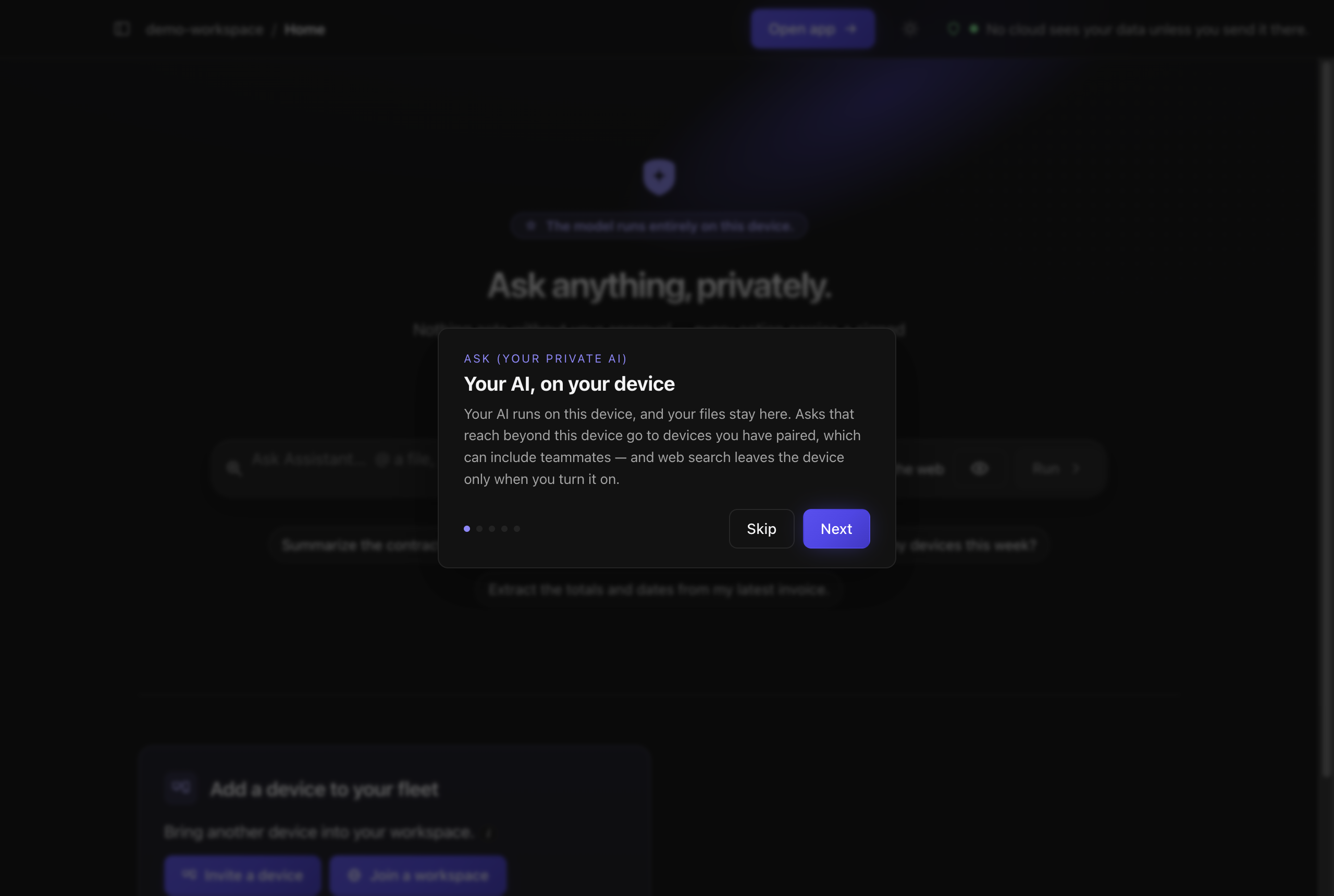
The app on first launch, with a short introduction card centred over the
                dimmed home screen. The card's eyebrow reads Ask, your private AI, and its
                heading reads Your AI, on your device. The body says the AI runs on this
                device and files stay there, that asks reaching beyond this device go to
                devices you have paired, which can include teammates, and that web search
                leaves the device only when you turn it on. Five step dots, and Skip and
                Next buttons.
First launch. The app opens on a short tour whose first card, “Your AI, on your device,” states the boundary and its two exceptions in one breath: “Your AI runs on this device, and your files stay here. Asks that reach beyond this device go to devices you have paired, which can include teammates — and web search leaves the device only when you turn it on.” Five cards, and Skip is offered as an equal choice beside Next. Captured on v1.0.12.

macOS is signed and notarised, so it installs normally.

!
Windows and Linux are not code-signed. SmartScreen will warn you: choose More info → Run anyway, or verify the bytes with the command above first. Updates are manual on Windows for the same reason: you install each new version the way you installed this one.

There is nothing to install. The command-line tool is a single static binary: make it executable and put it on your PATH.

chmod +x armore-darwin-arm64
mv armore-darwin-arm64 /usr/local/bin/armore
armore --help
!
Which copy you have decides this. The one inside the installer carries the app's notarisation and opens clean. The one you download on its own does not: it is a bare binary, so Gatekeeper may quarantine it on first run.

Put it on your PATH

The Linux package does this for you. On macOS or Windows, one line:

macOS
sudo ln -s \
  "/Applications/Armore Edge.app/Contents/Resources/bin/armore" \
  /usr/local/bin/armore

Windows (PowerShell, default install location)
$p = [Environment]::GetEnvironmentVariable('Path','User')
[Environment]::SetEnvironmentVariable('Path',
  "$p;C:\Program Files\Armore Edge\resources\bin", 'User')

Then armore works from any directory, and that short form is what goes in an MCP client's config.

Step 4

First run downloads a model

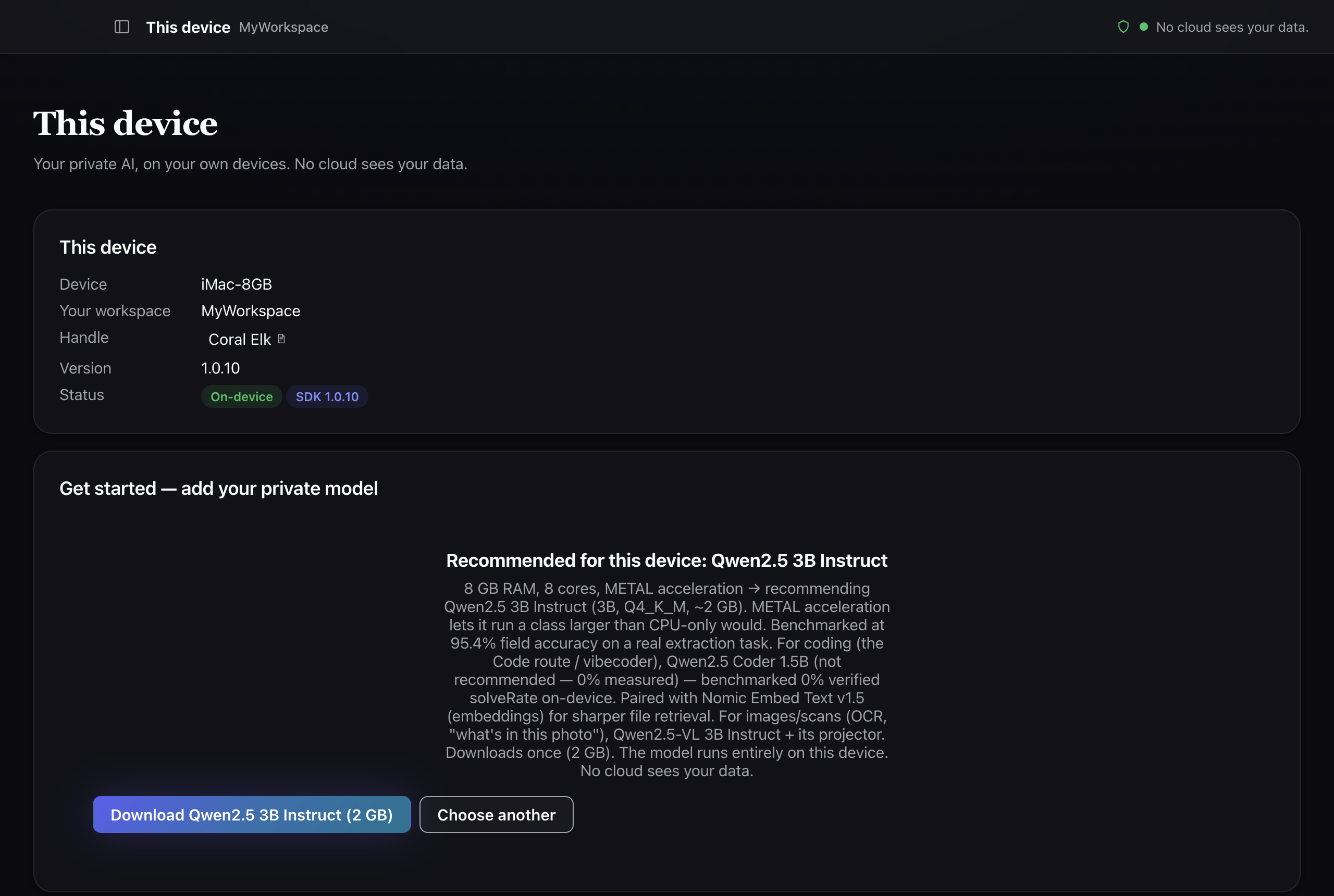
The app's This device screen on an 8 GB iMac. A Get started panel
                  recommends a 3B model for this hardware, explains the reasoning from
                  the machine's memory, cores and acceleration, notes which coding model
                  it does not recommend and why, and offers to download the recommended
                  model or choose another.
On an 8 GB machine the app recommends a smaller model and says why, reading the memory, cores and acceleration first, then naming the trade. It also volunteers what it would not use: a coding model marked “not recommended — 0% measured … 0% verified solveRate on-device.” A product willing to tell you a model scores zero on your hardware is the thing to look for; the alternative is finding out yourself. Captured on v1.0.10.
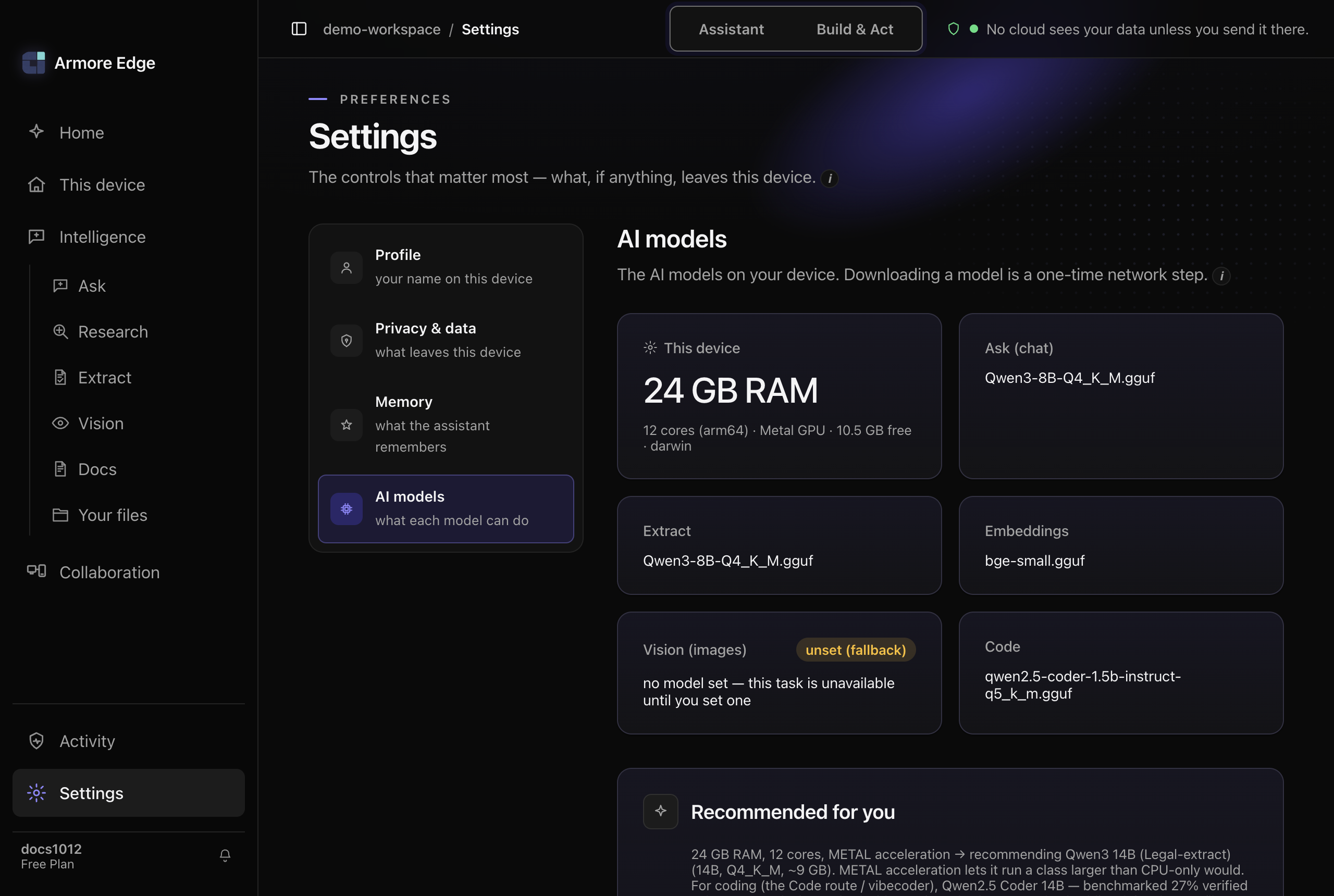
The app's Settings screen with AI models selected in the rail. A This
                device panel reports the machine's memory, core count, GPU, free disk and
                platform. Beside it, one card per task names the model that task uses —
                chat, extract, embeddings and code — while the vision card is marked unset
                with a fallback badge and says the task is unavailable until a model is
                set. Below, a Recommended for you panel explains which model suits that
                hardware and why.
Where the model comes from, in the app. One card per task, each naming the file that answers it — chat, extract, embeddings, code — so “which model is running?” has an answer you can read rather than infer. Vision is deliberately empty here, badged unset (fallback) with the reason stated: “no model set — this task is unavailable until you set one.” An absent capability says so instead of quietly degrading. The panel reads the machine first — memory, cores, GPU, free space — and recommends from that, stating plainly that “downloading a model is a one-time network step.” Captured on v1.0.12.

Armore Edge runs a real language model on your own hardware. It is not bundled in the installer; the app fetches it on first launch, after asking you. This is the slow part, and it is worth knowing the shape of it before you start.

WhatMeasured
ModelLlama 3.1 8B Instruct (Q4_K_M): third-party open weights we package; Armore did not train it
Size4,920,739,232 bytes (~4.9 GB)
Active download27 min 26 s on our connection
Realistic wall clock~46 min including verification
!
There is no resume. It needs one unbroken stretch: if the connection drops at 90%, it starts again. Start it when you can leave the machine alone, and make sure you have the disk space, because a full disk surfaces as a raw error rather than a helpful one.

After this, inference is local and works offline. You can confirm that for yourself later with armore models capabilities, or by pulling your network cable and asking it something.

The command-line tool does not download a model for you. You point it at a .gguf file you already have, every time:

armore ask --json \
  --model ~/models/llama-3.1-8b-q8.gguf \
  "a question"
!
This is the biggest difference between the two surfaces. The app fetches and manages a model for you after asking; the command line assumes you have brought your own and names it on every call. Neither one reaches the other's model store.
Step 5

What you get

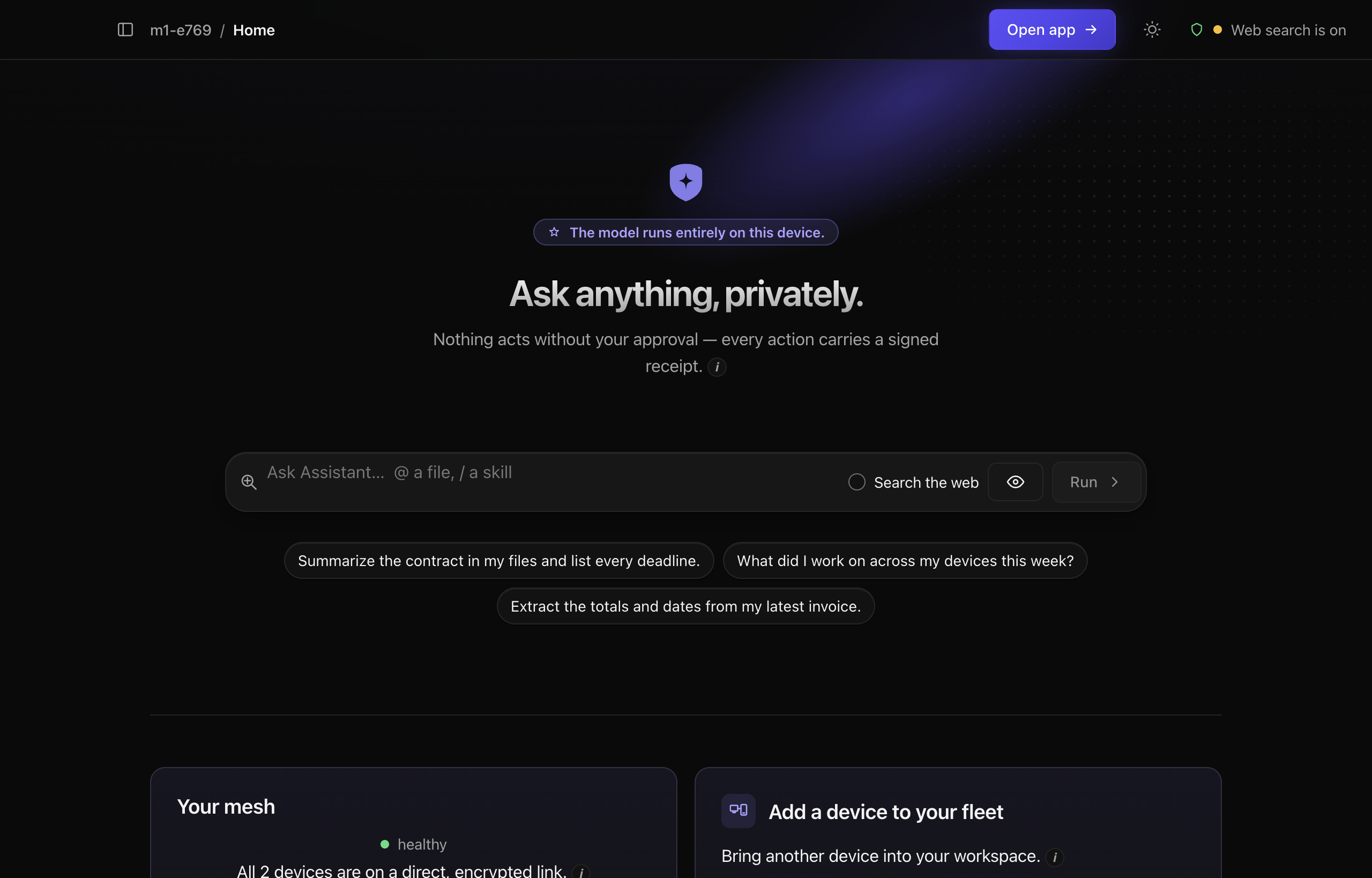
The app's assistant home. A prompt box sits above three suggested
                questions about summarising a contract, recalling recent work, and
                extracting totals from an invoice. Below, one card offers to finish
                setting up cross-device search and another offers to bring a second
                device into the workspace.
The assistant home, where you land after the tour. It opens with suggestions rather than an empty box, and the cards beneath it are the two optional next steps; neither is required to start asking questions. Captured on v1.0.12.
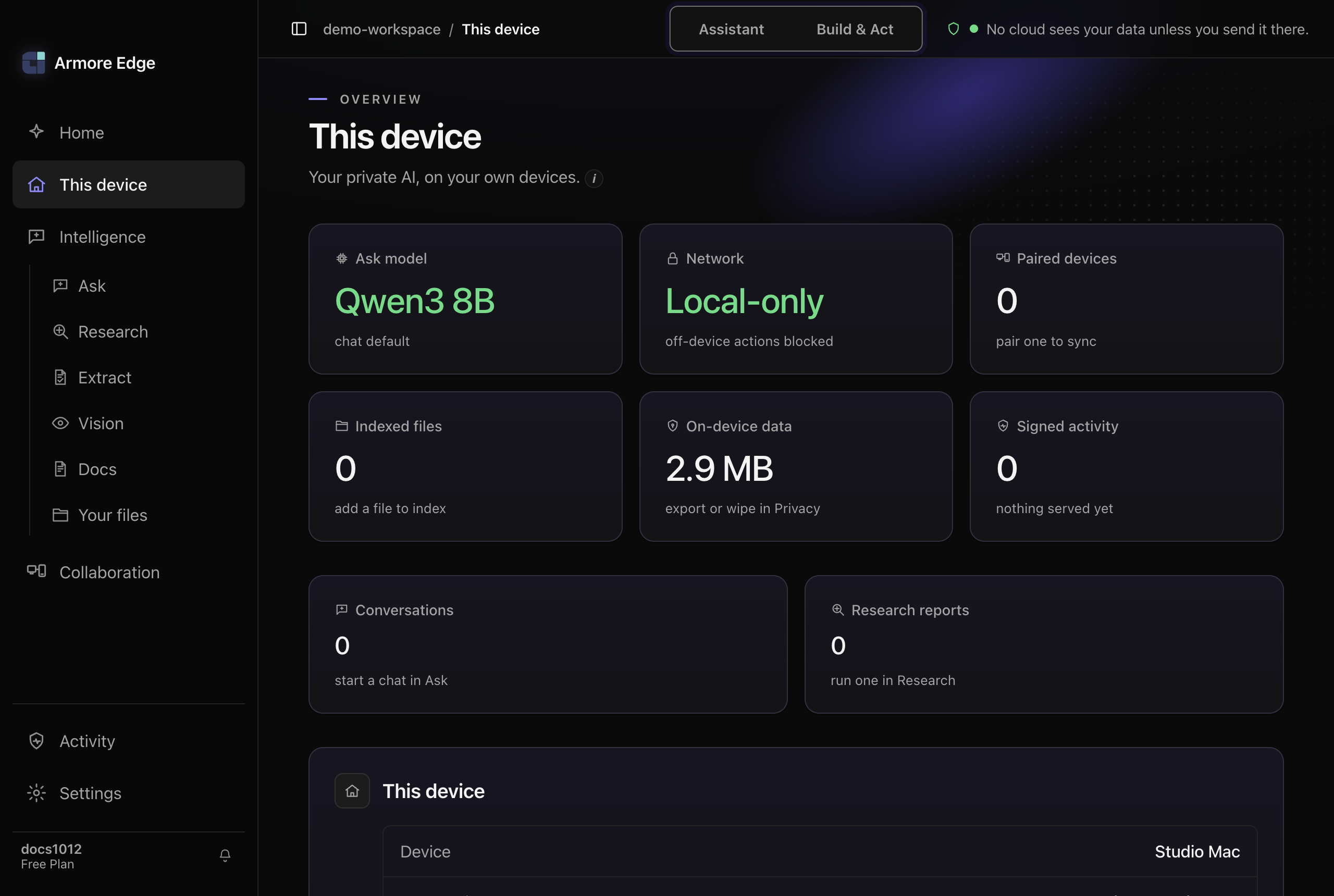
The app's This device screen on a fresh install. Tiles report the chat
                model in use, a Network tile reading Local-only with the note off-device
                actions blocked, the size of on-device data, and five counters — paired
                devices, indexed files, signed activity, conversations and research
                reports — every one of them zero. The header states that no cloud sees
                your data unless you send it there.
What a fresh install looks like in the app. Five counters, all zero — paired devices, indexed files, signed activity, conversations, research reports — the chat model named beside them, and the Network tile reading Local-only with the note “off-device actions blocked” before you have changed anything. The only figure that is not zero is the app’s own footprint, and it tells you where to erase it: “export or wipe in Privacy.” Captured on v1.0.12.

Ten surfaces, in two areas:

  • Assistant: Ask, Research, Extract, Vision, Docs, Your files
  • Build & Act: Code, Actions, Workflows, Build

Plus four destinations in the rail: This device, Collaboration, Activity and Settings.

✓
Two cards you may see are prompts, not errors. “Finish setting up cross-device search” means a dedicated search model has not been downloaded yet, so asking across devices can come back empty even when the answer exists. “Add a device to your fleet” is optional: Edge is fully usable on one machine.

No dashboard: you ask the binary what it can do, and it answers from the build you actually have rather than from a spec:

$ armore models capabilities

That reports the backends compiled into this binary. It is the honest check before you assume a feature is present: the command-line guide lists what each of the twenty commands refuses to do, which is usually more informative than what it does.