Connect a cloud provider beta
Cloud works when a key or a Pro entitlement is present. A build with neither shows the option closed and names who can open it, rather than hiding it. Connecting one is an administrator task, done outside the app — this page is for whoever does it. If you are not that person, the short version is the first section.
What you see when it is not connected
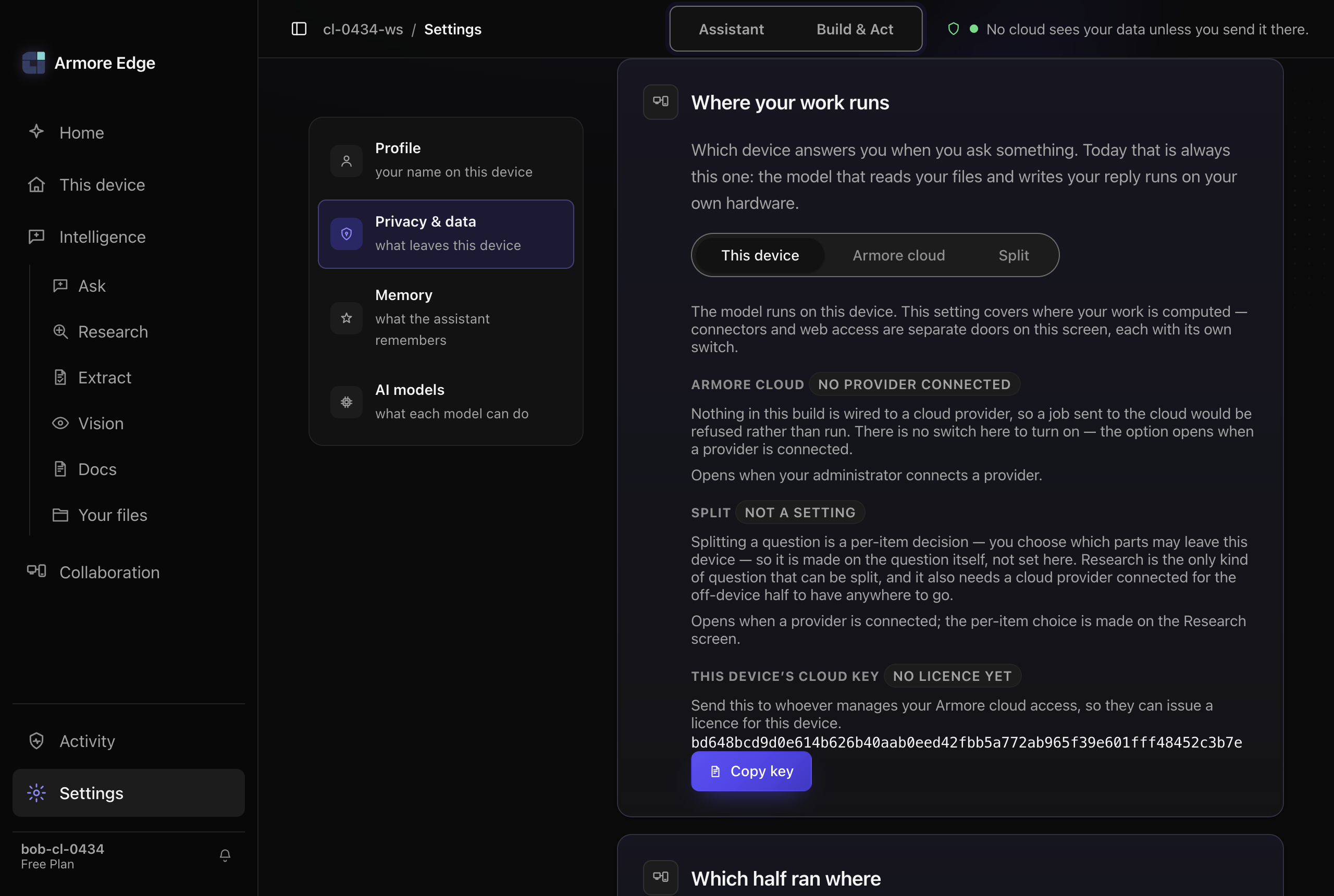
The cloud option is present in the routing card and unavailable, carrying the label No provider connected and this explanation:
Nothing in this build is wired to a cloud provider, so a job sent to the cloud would be refused rather than run. There is no switch here to turn on — the option opens when a provider is connected.
What an administrator connects
Provider configuration comes from one of two places, and never from the interface: a JSON file in the application's own data directory, or the environment the app is launched in (ARMORE_CLOUD_ENDPOINT, ARMORE_CLOUD_API_KEY, and the optional ARMORE_CLOUD_PROVIDER, ARMORE_CLOUD_REGION, ARMORE_CLOUD_MODEL_ID). There is no in-app form, by design — a provider credential is not something the interface collects.
That second path is open to you today, not only to an administrator in a managed fleet: bring your own endpoint and your own key, and the cloud option opens against the provider you chose and bill. Any OpenAI-compatible endpoint works — a hosted API, or something you run yourself such as vLLM or llama.cpp on a machine with more memory than the one in front of you. This page is written for whoever does that, whether that is your IT department or you on your own machine.
The endpoint has a default; the key does not. Leave the endpoint unset and the app uses Armore's own inference service. The key is the half that is missing from every shipped build, and it is missing on purpose: a key compiled into a desktop binary is extractable by everyone who installs it, and the endpoint it opens bills by the second. So supplying a key alone is enough, supplying an endpoint alone is not, and with neither the reason stays cloud-not-provisioned rather than changing to something that implies progress.
A Pro entitlement opens it with no key at all — and only for Armore's own service. An entitlement is Armore vouching for your device against Armore's proxy; it says nothing about a third party's billing endpoint, so if an administrator points the app at their own endpoint, that one still needs its own key. Two things must both hold: the entitlement file has to be present, and its plan has to verify as paid against the pinned issuing key. Presence alone would be a hole — an empty file would otherwise open a paid option.
What choosing cloud actually means for your text
Armore runs on your device by default. No cloud sees your data unless you send it there — and the cloud tier is the case where you send it there, on purpose, one request at a time. This section is the part you should read before you do.
None of this is true of the device tier or of your own paired devices, and the distinction is the whole point of having two tiers. Work that runs on This device never reaches a server. Choosing cloud is a decision to trade that for a larger model than your machine can hold.
Once it is open, every call still asks
Connecting a provider does not make jobs start leaving. Consent is per invocation, not a remembered grant: allowing one job does not allow the next, and declining is an ordinary outcome rather than an error.
Withdraw permission while a job is in flight and it stops, recorded as consent-revoked-mid-job — kept distinct from never having allowed it, because you performed an action and are owed confirmation that it took effect.
Local-only stops it before anything is sent
With local-only on, a cloud call is refused egress-blocked. The name is precise: the guard refused before any byte reached the wire, not after a failed attempt.
Limits exist, and they are not shown to you
There are two, and they belong to different people. An allowance is yours and resets. A ceiling is ours and clears when we raise it. When one stops a job the card says which, so the product never blames you for our budget — cloud-spend-cap-reached reads "Not your allowance and not your fault."
One honest bound on the ceiling: it is checked on this device, before a job is sent. The metering service counts what each device uses, but it does not refuse on money — so treat the ceiling as a brake the app applies, not as a guarantee enforced somewhere else on your behalf.
The four refusals, and who can clear each
| Reason | What happened | Who can clear it |
|---|---|---|
| cloud-not-provisioned | No provider is connected | Your administrator |
| cloud-grade-unproven | A provider answered but never proved it met the bar | The provider |
| cloud-allowance-exhausted | Your allowance is spent; it resets | You, on your renewal date |
| cloud-spend-cap-reached | Our own ceiling was reached | Us |
Three of those four are nothing you can act on, and the page says so rather than offering a remedy that is not yours to apply.
What you can check afterwards
A run that used a provider says so, and one that only partly did says which half ran where — see one run, two halves. If a half came back from a host the product could not verify, the run reads unverifiable rather than local: it will not tell you your data stayed on your device unless it can prove it did.