Install a connector
A connector is an external MCP server the CLI can talk to. The client is compiled into the CLI, so there is nothing to install for that part. The catalog it can install from contains exactly one entry — and most of this page is about the gates it has to get through, because that is the part worth checking.
See what you can install
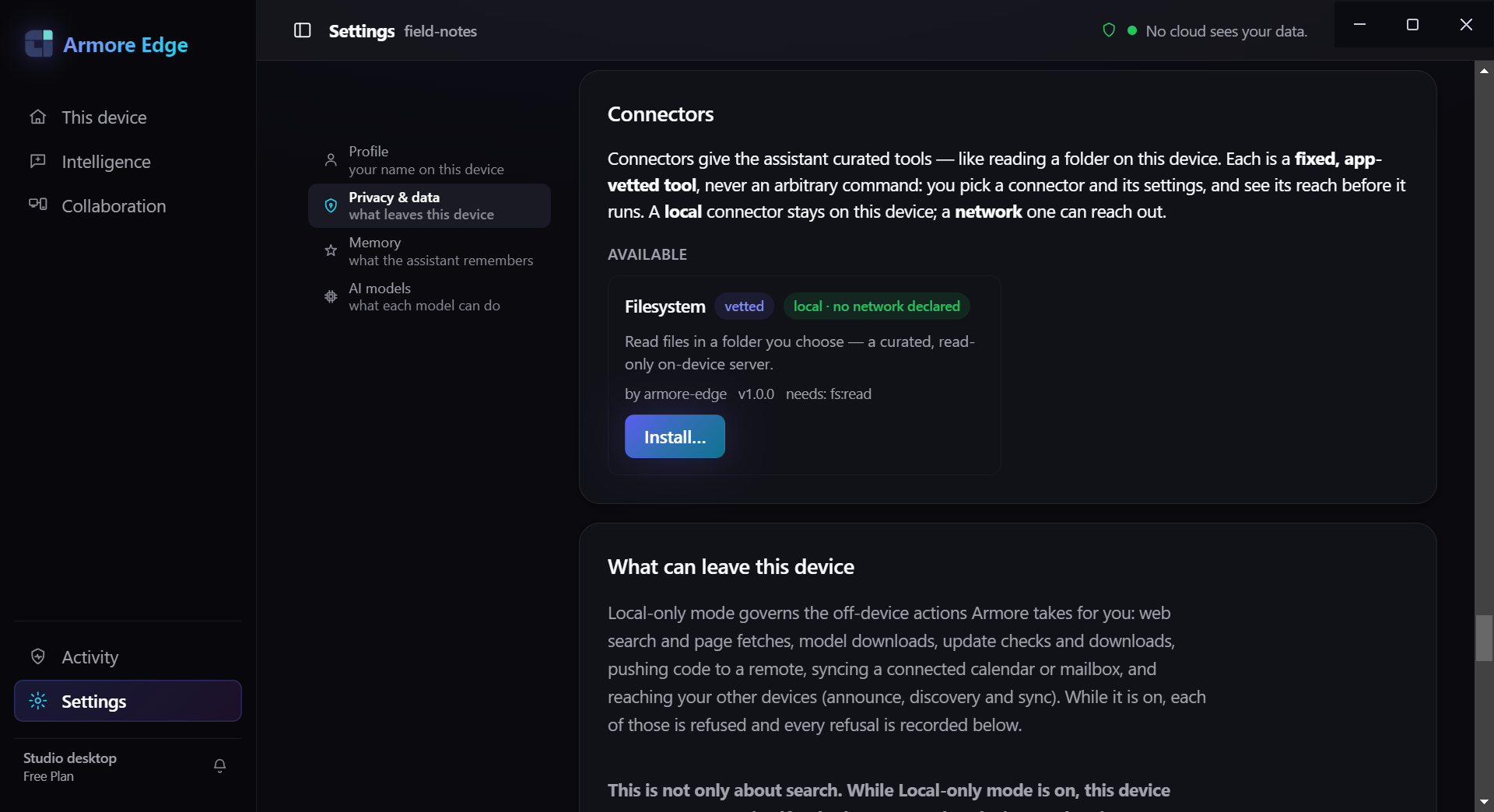
fs:read — next to a badge saying whether it reaches the network
at all. That is the page's whole argument in one panel: you see the reach
before it runs.
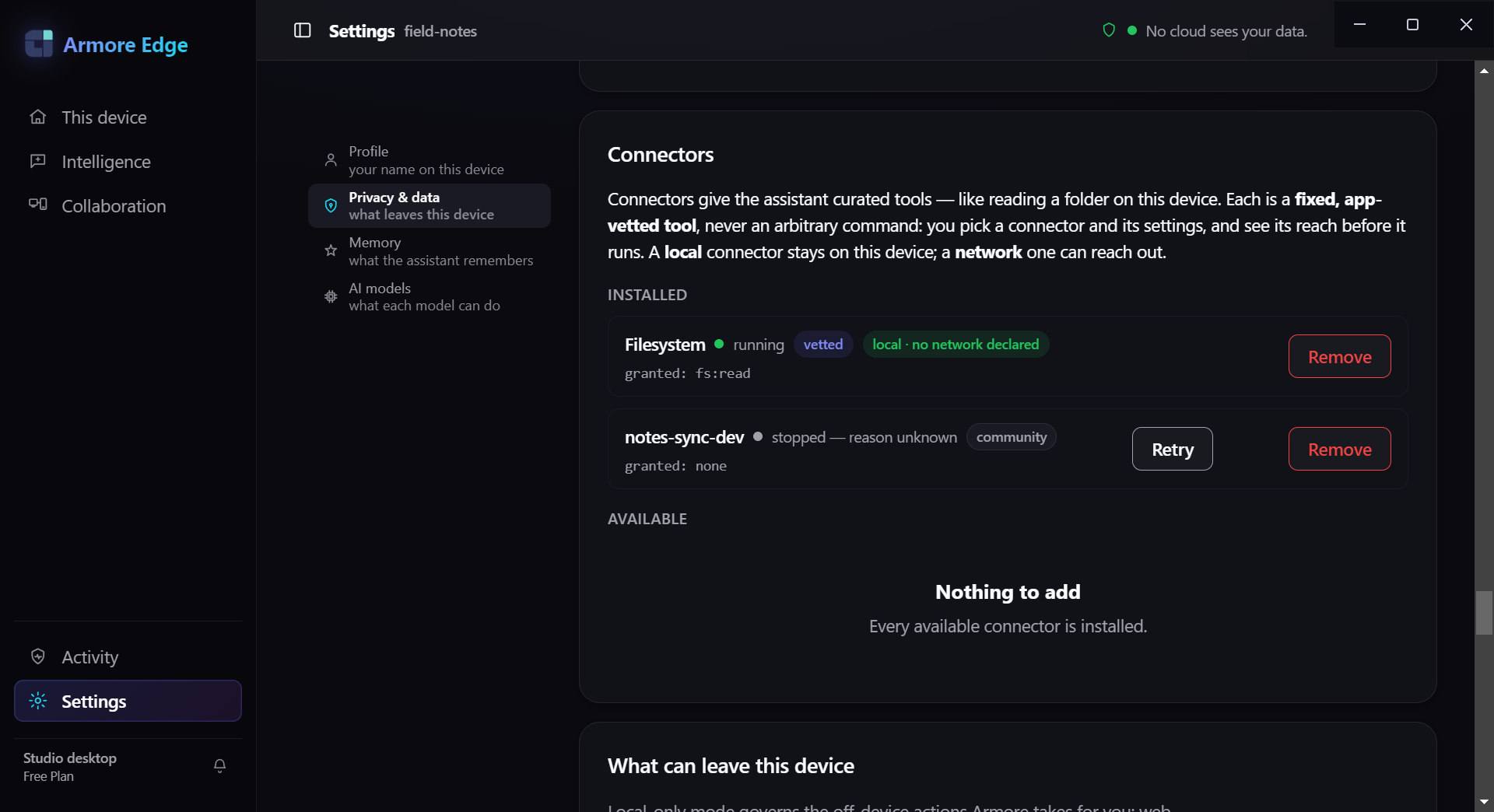
granted: none. The app states the
rule above them — each connector is a fixed, app-vetted tool rather than an
arbitrary command, and “a local connector stays on this device; a network
one can reach out.” Review status and reach are shown before you install,
not after.
You need the command-line tool for this page; the MCP client lives inside it. Start with the catalog:
$ armore mcp catalog --json
{
  "command": "mcp.catalog",
  "count": 1,
  "entries": [
    {
      "description": "Read files in a folder you choose — a curated, read-only
                      on-device server.",
      "egress": "local",
      "homepage": "",
      "id": "filesystem",
      "name": "Filesystem",
      "publisher": "armore-edge",
      "required_scopes": ["fs:read"],
      "trust": "vetted",
      "version": "1.0.0"
    }
  ],
  "ok": true,
  "registry_source": "embedded"
}
That is the whole catalog. One entry, filesystem, published by
armore-edge, asking for one scope (fs:read).
registry_source: "embedded" means the catalog is compiled into the binary
you are running — no file is fetched and none ships beside the release asset.
--cmd (Step 3) — which is a meaningfully different trust position, and the
CLI says so every time you do it.
Install it
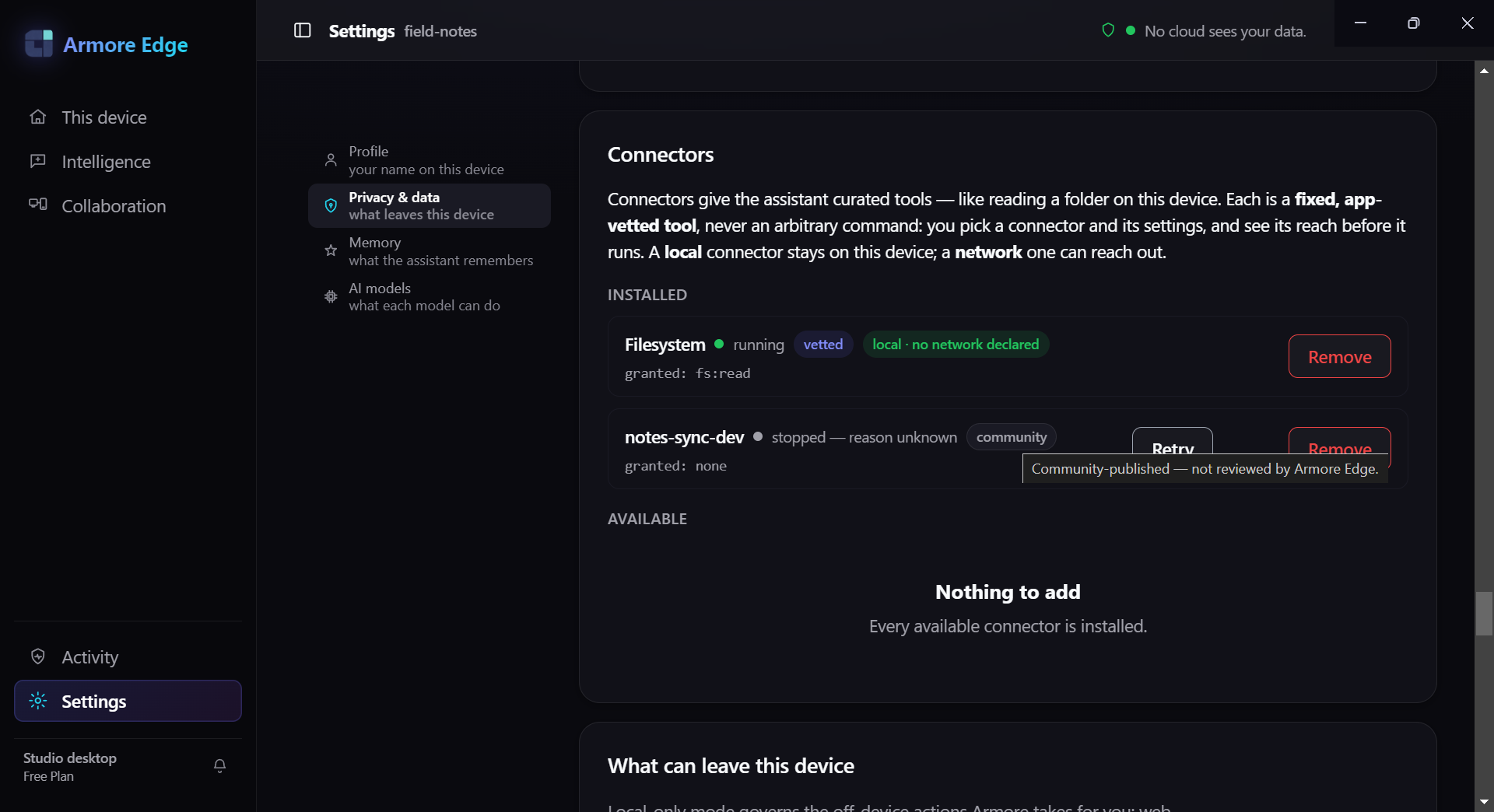
none.
install records a connector in your local config. It needs the launcher
command, because the catalog deliberately does not carry one —
--launch-cmd is required, and leaving it off exits 2:
$ armore mcp install filesystem
error: the following required arguments were not provided:
  --launch-cmd <LAUNCH_CMD>
# exit 2
With it:
$ armore mcp install filesystem \
    --launch-cmd /usr/local/bin/armore-mcp-filesystem \
    --launch-arg ~/Documents
command: mcp.install
config_path: ~/.config/armore/mcp/connectors/filesystem.json
egress_class: network
granted_scopes: ["fs:read"]
id: filesystem
name: Filesystem
registry_source: embedded
trust: vetted
vetted: false
warning: the catalog compiled into this binary verified against its compiled-in
         registry pubkey, but `vetted` is reserved for a signature checked against
         a key YOU supplied — pass --registry-key <hex> for that.
trust: vetted and
vetted: false. The first is a label carried in the catalog. The second
is the honest result of the check, and it is false because the signature
was verified against a key that shipped in the same binary as the catalog — which
proves nothing to you. Pass --registry-key <hex> with a key you
obtained independently if you want that field to mean something.
What landed on disk is a small unsigned JSON file. Reading it is the fastest way to understand the trust model:
$ cat ~/.config/armore/mcp/connectors/filesystem.json
{
  "id": "filesystem",
  "name": "Filesystem",
  "granted_scopes": ["fs:read"],
  "cmd": "/usr/local/bin/armore-mcp-filesystem",
  "args": ["/Users/you/Documents"],
  "trust": "vetted",
  "egress": "local",
  "catalog_verified": false,
  "installed_at": 1791976048
}
cmd is whatever you typed, and nothing signs this file. That is why
--connector is not a safer alternative to --cmd
later on — it only moves the moment you chose the command from run time to install
time. The CLI's own help says it plainly: “its command is also caller-chosen (at
install) and stored unsigned.”
Adding --receipt-key-file <path> signs a Class-R install receipt
over the consent snapshot, so there is a record of what you agreed to install and when.
Omit it and installation still works, unrecorded. Confirm what is registered with:
$ armore mcp installed --json
{
  "command": "mcp.installed",
  "connectors": [
    {"granted_scopes":["fs:read"],"id":"filesystem","name":"Filesystem","trust":"vetted"}
  ],
  "count": 1,
  "ok": true
}
List its tools — and meet the fail-closed default
granted: scope directly, so the reach is
visible without listing tools separately. The fail-closed default is the same
either way — nothing is granted until you grant it.
mcp tools starts the connector and asks what it can do. Try it as
installed and it refuses. The refusal is long because it explains itself; read it
rather than skipping to the flag:
$ armore mcp tools --connector filesystem
error: refusing to spawn a connector that can egress, before any gate can observe
 it. EVERY connector resolves to `network`: there is no local exemption. One
 existed and was removed (#5046/#5071) because it keyed on a bool in the same
 unsigned file as `cmd`, so anyone who could choose the command could also grant
 themselves the exemption. A catalog's `local` declaration is read and
 deliberately NOT honoured, signed or not — --registry-key verifies the catalog at
 install and does NOT earn an exemption here. To spawn this connector, pass
 --allow-network-egress deliberately.
# exit 1
egress: local. The runtime does not believe it.
And it is right not to: that flag lives in the same unsigned file as cmd,
so whoever picks the command could also award themselves the exemption. A connector
being described as read-only is not a property anything can check, so the
CLI treats every connector as network-capable and makes you say so out loud.
Say so out loud, and it runs:
$ armore mcp tools --server fs --cmd <your-server> --allow-network-egress
command: mcp.tools
command_source: caller-supplied-inline
count: 1
jail: enforced
jail_reason: null
server: fs
server_info: {"name":"…","protocol":"2024-11-05","version":"…"}
tools: [{"fleet_name":"mcp__fs__<tool>", …}]
command_source records how the command was chosen —
caller-supplied-inline for --cmd. Each tool gets a namespaced
fleet_name of the form mcp__<server>__<tool>.
mcp ping takes the same flags and is a liveness check only.
The sandbox — what it does, and where it stops
On macOS, tools and ping spawn the connector inside a kernel
(deny network*) jail with a built-from-scratch environment. Both halves
are measurable, so here they are measured.
The network half
A one-file MCP server that tries to open a TCP connection to 1.1.1.1:53
when it starts, and reports the outcome as its own version string. Run plain, with no
Armore involved, it gets out:
$ python3 -c "import socket; socket.create_connection(('1.1.1.1',53),timeout=4); print('REACHED-NETWORK')"
REACHED-NETWORK
Spawned by mcp tools, the same server does not:
$ armore mcp tools --server np --cmd python3 --arg netprobe.py --allow-network-egress
jail: enforced
jail_reason: null
server_info: {"name":"netprobe","protocol":"2024-11-05",
              "version":"blocked: PermissionError"}
The environment half
A second probe reports the environment variables it can see. With
ARMORE_LEAK_PROBE exported in the calling shell, the connector receives
five variables and none of them is ours:
$ ARMORE_LEAK_PROBE=shouldnotleak armore mcp call --tool env_names …
result: HOME,LC_CTYPE,PATH,TMPDIR,__CF_USER_TEXT_ENCODING
The environment is built, not inherited. No ARMORE_* key reaches a
connector on any path.
1.
mcp call is not jailed. It is the egress path, so it cannot be.
The same probe that reported blocked: PermissionError under
tools reports REACHED-NETWORK under call — one
machine, one connector, two code paths. Discovery is confined; invocation is not.
2. Only macOS has a jail backend. On any other platform the output reports
jail: degraded and the connector runs unconfined. The
field is there so you can check rather than assume — read it, do not trust this
sentence.
Calling a tool: three gates, all of them refusable
mcp call invokes a tool. Because it egresses, it will not run until it has
an explicit approval and a signed receipt. Each gate below is the real output
of omitting the corresponding flag.
Gate 1 — approval
$ armore mcp call --server fs --cmd … --tool <tool> --allow-network-egress </dev/null
refusing `mcp__fs__<tool>`: an external MCP call egresses off-device and needs
 approval, but stdin is not a terminal and --yes was not given. Re-run with --yes
 to approve this egress explicitly.
error: egress DENIED for `mcp__fs__<tool>` — no approval given, so the call did
 not run (no MCP tool egresses without an explicit approval + signed receipt)
# exit 1
At a terminal you get an interactive prompt instead. In a script, no
--yes means no call — a non-interactive stdin denies rather than defaults
to yes.
Gate 2 — the receipt
$ armore mcp call … --allow-network-egress --yes
error: no secret supplied for --receipt-key. Use --receipt-key-file <path>,
 --receipt-key-file - (stdin), or set $ARMORE_RECEIPT_KEY
# exit 1
Unlike the install receipt, this one is not optional: no receipt means no egress. And the key cannot be handed over on the command line at all —
$ armore mcp call … --receipt-key <64-hex>
error: --receipt-key was given a literal key on the command line, which puts it in
 `ps` output and your shell history (#3605). Pass it out-of-band instead:
  --receipt-key-file <path>   read it from a file (chmod 0600)
  --receipt-key-file -        read it from stdin
  ARMORE_RECEIPT_KEY=<hex>    read it from the environment
The literal form is refused rather than warned about, because by the time a
warning prints the key is already in your history file.
# exit 1
warning: … is mode 0644 — group/other readable. chmod 0600
      it.
before the call proceeds.
Gate 3 — and only then, the call
$ armore mcp call --server fs --cmd … --tool <tool> \
    --allow-network-egress --yes --receipt-key-file ~/.armore-receipt.key
command: mcp.call
command_source: caller-supplied-inline
fleet_name: mcp__fs__<tool>
is_error: false
receipt: {"author":[…],"input_blake3":"dfd88e009ce735b8ba446ac4965a7721…",
          "model":"act:mcp-tool-call",
          "output":{"structured":{"action":"mcp-tool-call","actor":"cli-local",
            "kind":"act-receipt","outcome":"sent","transmitted":true,
            "contentDigest":"2b5a20523dfcc06ca73077aea1aef507…",
            "recipientDigest":"be726b61602057ef6958400911596c3d…"}},
          "ran_offline":false,"signature":[…]}
result: <the tool's output>
The receipt is a Class-C act receipt: it hashes the input, names the action, records
transmitted: true and ran_offline: false, and signs the lot.
It is the one artifact that distinguishes “something left this machine with my consent”
from “something left this machine.”
Save that receipt object to a file and you can check it, offline, with no
key and no network:
$ armore audit receipt act-receipt.json --json
{
  "author": "26b7a38d4468bc82fea1f935590d95de7e4c92d333efdb24d70eea87f972212d",
  "command": "audit.receipt",
  "input_blake3": "dfd88e009ce735b8ba446ac4965a77216521968cefbf20f3fdac7ac6be309382",
  "model": "act:mcp-tool-call",
  "ok": true,
  "ran_offline": false,
  "valid": true
}
input_blake3 in that file and
re-run: "valid": false, exit code 2. A verifier that cannot be made to
fail is not telling you anything, so this is the check worth doing once yourself before
you believe any of the green ones.
--json declares a non-human caller, and that path additionally demands
--allow-unpinned-cmd:
“--json declares a non-human caller, and mcp tools/call
LAUNCH a caller-chosen command — a server may reach the network the moment it
starts.” Nothing anywhere verifies who chose that command, which is the
honest reason the flag exists rather than being inferred.
Remove it
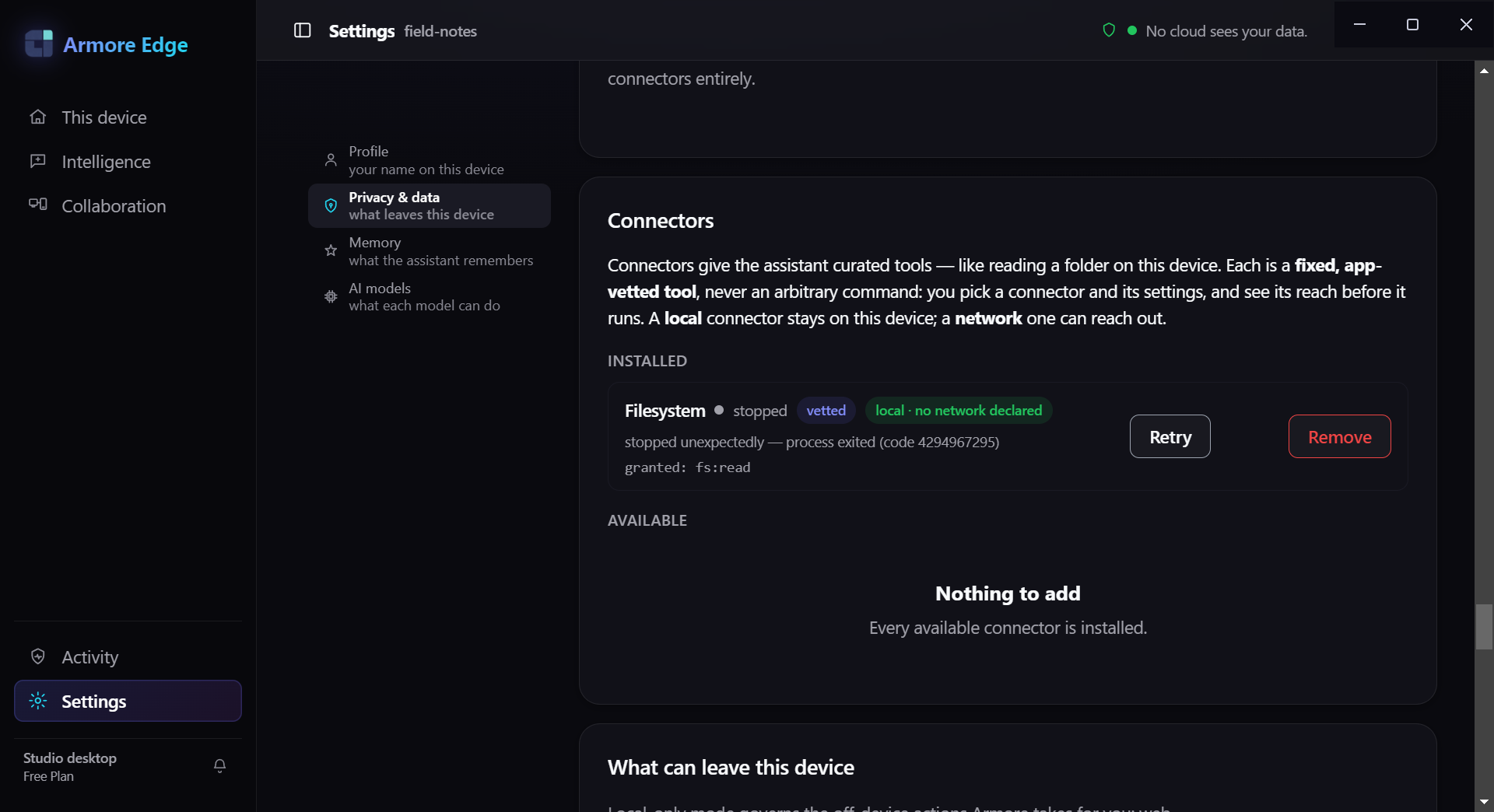
$ armore mcp uninstall filesystem --json
{"command":"mcp.uninstall","id":"filesystem","ok":true,"removed":true}
That deletes the connector config. It does not touch the connector's own binary, which
you installed yourself and must remove yourself. The config directory as a whole shows
up as the mcp store in
armore privacy list.